Get Boosted by the Minit SDK!
One required call, a few that make it shine. The Minit SDK is small on purpose, so you can spend your time on the game.
In short
- One required call:
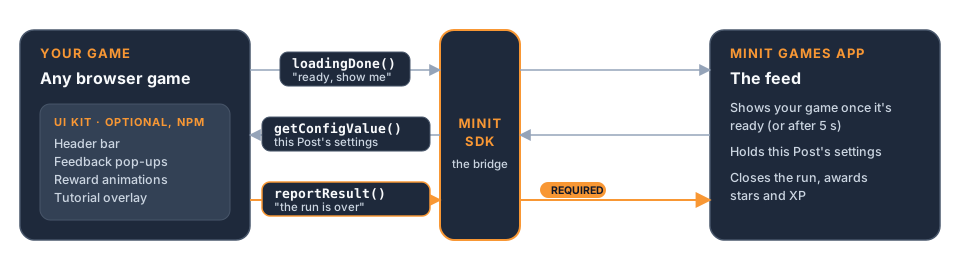
reportResult. AddloadingDoneandgetConfigValuewhen you're ready.- The UI kit (npm only) gives you a header bar, feedback pop-ups, rewards and a tutorial overlay.
- Building with an AI assistant? Connect the Minit MCP Server so it reads the live rules and validates your build.
The one call you must make
reportResult is the one call every Game must make (the npm package also needs a one-line setup call at startup). It tells Minit Games how the run ended, and it's what turns a play into XP, stars, and a result screen.
If you've read Land the Ending!, you already know the rule: call it once, when the run is over. Everything below is optional, but each one makes your Post feel better on a player's phone.
Three ways to make it shine
Say when you're ready. loadingDone tells the app your game has finished loading. The app waits up to 5 seconds for it, then shows your game anyway. Calling it means players never see a half-drawn first frame. It has no effect in the Minit Studio preview, so check it on a phone. Why the first second matters: Get Them Playing Instantly!.
Read this Post's settings. getConfigValue reads the settings you chose for this particular Post: the level, the speed, the theme. It's what lets one Game become many different Posts. Pair it with the SDK's seededRandom() helper and a seed setting, and every player of a Post gets the same generated level. Build to Post! covers how to plan those settings.
Borrow the UI kit. If you build with the npm package, the SDK includes a small toolkit of ready-made pieces: a header bar, feedback pop-ups, reward animations, and a tutorial overlay. They match the look of the rest of the app, so your game feels at home in the feed. This kit is npm-only; the engine plugins don't include it. The tutorial overlay is covered in Get Them Playing Instantly!.
Want your game to remember a player's best score? That's Remember Your Players.
Tip: You don't need everything on day one. Ship with
reportResult, then add the others one at a time and feel the difference on your phone.
Your engine is covered
Using Unity, Godot, Defold or PlayCanvas? Each one has a Minit SDK plugin with the core calls, named the way your engine expects. Your engine's page walks you through setup, step by step.
Tip: No bundler? You still don't need a build step: copy the SDK modules you use into your ZIP, or start from the vanilla template, which does that for you. Never write your own
window.minitstand-in; the platform injects the real one. How to Convert Your Game for Minit Games walks through the no-build path.
Building with an AI assistant?
Many creators build their Games with AI coding tools. Two ways to make that go smoothly:
- Connect the Minit MCP Server. Your assistant can then read the live platform rules, check your build against them, and even manage your Posts for you. It's the fastest way to avoid "almost works" uploads.
- Use the ready-made prompt. If your tool can't connect to an MCP server, Build with AI Tools has a prompt you can paste in, so your assistant knows the rules from the start.
Either way, ask your assistant to validate the build before you upload it.
A quick reality check
Before you call your integration done, open your Game on a real phone and watch the first second closely. Does it ever flash a blank or half-loaded screen? Does the result screen appear when the run ends?
If both look right, you've got the whole integration. That really is all of it.
Go deeper
- Install the Minit SDK
- Game Ready Signal
- Game UI: HUD, Feedback & Rewards
- Build with AI Tools
- Minit MCP Server
- Reporting Results
- Interactive Tutorials
- Saving User Data
- How to Convert Your Game for Minit Games
- Testing Your Game on Device (Preview & Share Links)
- Engine guides: Unity, Godot, Defold, PlayCanvas