Build to Post!
One upload, a month of Posts. The secret is building your Game so each Post can change it without a new upload.
In short
- Declare settings in
meta.json, set them per Post in Minit Studio, and build each level from them.- Same Post, same challenge: derive everything from the Post's settings, never from the clock.
- Each Post ranks on its own, so an easy Post and a hard one can score completely differently.
Decide what can change
Before you write a single level, ask: what could be different from one Post to the next?
Good candidates:
- the level or puzzle number
- difficulty
- speed
- a time limit
- a color theme
- a word list
You declare these settings in your Game's meta.json file, up to 25 of them. Each one becomes a dial you can turn later, without touching your code again.
Start small. Three well-chosen settings can give you weeks of distinct Posts. Then plan a month of them with The Daily Habit!.
Turn the dials per Post
When you create a Post in Minit Studio, the settings you declared show up under Post Modifiers. Pick the values for this Post, write a caption that matches, and publish.
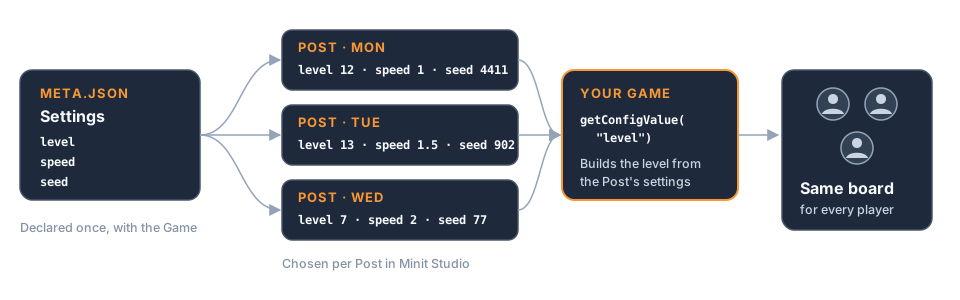
Inside your game, getConfigValue reads the values for whichever Post is being played. One Post can be "Level 3, slow"; the next can be "Level 3, double speed, 30-second limit". Same upload, a brand-new challenge.
Tip: Give each setting a short, clear key such as
speedortimeLimit, plus a plain-words description. You'll be choosing them for every Post, and clear names make that quick.
Same Post, same challenge
Here's the rule that makes Posts fair: every player of a Post should face exactly the same challenge. Why that matters: The Minit Games Format!.
Build the level from the Post's settings, never from the clock or from plain randomness. If two players on the same Post get different boards, their scores can't be compared, rankings stop meaning anything, and nobody can say "I beat it in 12 moves, can you?"
A little variety is fine, as long as it's the same for everyone on that Post.
The Minit SDK makes this easy. Declare a setting called seed and give each Post its own value. The SDK's seededRandom() helper reads that value automatically, so a maze, a spawn order or a card shuffle built with it comes out identical for every player of the Post, while Monday's Post and Tuesday's Post differ (Install the Minit SDK has the details). Use it for anything that affects gameplay; plain randomness is fine for pure cosmetics such as particles.
Tip: Without a
seedsetting, the helper falls back to the current time, and every player gets a different board. Declaring the setting is what turns it into a shared challenge.
Each Post ranks on its own
Stars compare a result only with other results on the same Post, never with your other Posts. How stars work: Land the Ending!.
That gives you a lot of freedom:
- Turn the dials as far as you like. A gentle Post where good runs score 200 and a brutal one where good runs score 20 both rate fairly, because each player is only measured against people who faced the same challenge.
- Make the score separate players. Within one Post, a good run should score clearly better than an average one. If almost everyone ends on the same number, for example because a level has a hard cap that's easy to hit, there's nothing to rank and the stars stop meaning much.
One thing stays fixed for the whole Game: whether a higher or a lower result is better, set by resultSorting in meta.json and locked once the Game is published. If you want a points mode and a fastest-time mode, give each its own Game.
Coming soon
Soon you'll be able to let others re-post your Game. You decide which of your settings they may change, and other creators then publish their own Posts, called Mods, from your Game with their own values. Every one of those Posts is another front door to your work, made by someone else. You'll also be able to make assets configurable, so a single Game can wear many different looks.
Designing your Game around clear settings today means it'll be ready when that arrives.