
Find Your Players!
What the feed actually measures. Knowing it helps you make Posts that travel further.
In short
- The feed rewards play time on a roughly one-minute scale, finished runs and Cheers.
- Star ratings and posting frequency are not ranking signals.
- Compare Posts of the same Game in your Studio analytics, then vary what worked.
Time well spent
The first signal is simple: how long players stay with your Post. The feed looks at play time on a scale of about a minute.
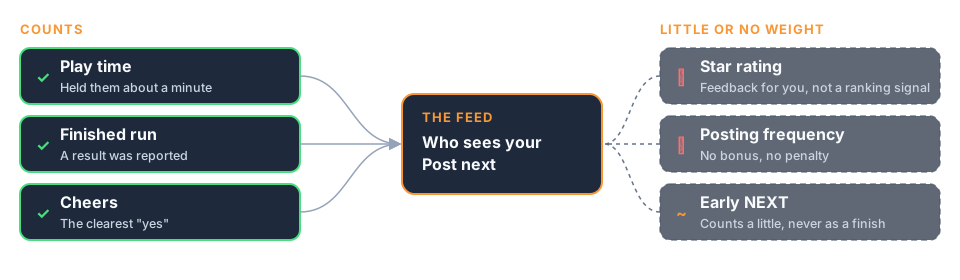
That doesn't mean you should stretch your game out. It means a Post that holds a player for about a minute, from first touch to result, tells the feed "people enjoy this". A Post that loses players in the first few seconds tells it the opposite.
There's no magic cut-off to hit. Just aim to make that minute feel good.
Finishing counts
When your game reports a result, that play counts as completed. A completed play is a strong, clear signal that the player stuck with you to the end.
When a player taps NEXT before your game reaches its ending, that's a weaker signal. One early NEXT won't hurt you. A Post where most players leave early will struggle.
This is why landing the ending matters so much. A game that never reports a result never earns that completion signal at all.
Cheers are the clearest yes
A Cheer is a player telling the feed, in one tap, "more of this, please". It's a clear positive signal for a Post.
Cheers help you directly too: you earn XP for every Cheer your Posts receive. The way to earn them is by making the ending satisfying and the flavor text worth smiling at. Making those lines count: Turn Players into Fans!.
What doesn't move the needle
Two things creators often assume matter, but don't count toward ranking:
- Star ratings. Stars are for players. A Post where most people score one star isn't ranked lower for it.
- How often you post. Posting more doesn't raise your ranking by itself. What it does is give you more fresh Posts, and fresh Posts each get their own chance.
So don't make your Game easier just to hand out stars, and don't post filler just to post. Make each Post worth a minute. That's the idea behind The Daily Habit!.
Read your numbers
Minit Studio shows how your Posts are doing, including views, plays and Cheers. If you use the Minit MCP Server, your AI assistant can pull the same numbers for you.
The most useful comparison is between Posts of the same Game. Same mechanics, different settings, so the difference in numbers tells you which settings players enjoyed more. Making settings easy to vary: Build to Post!.
Tip: Plays count finished runs, so compare plays with views. If many people see a Post but few finish it, the opening or the caption is likely the problem. If they finish but don't Cheer, look at the ending. Fixing the opening: Get Them Playing Instantly!.