
Turn Players into Fans!
From one play to a fan. A player who follows you is the start of an audience that comes back.
In short
- A follow boosts your recent Posts; it never guarantees them.
- Earn the follow with a recognizable series and consistent captions.
- Shares carry your flavor text; post a public play link with a challenge where your players hang out.
What a follow gets you
When a player follows you, your recent Posts show up for them more often. It's a real boost, but it isn't a promise: followers won't see every single Post you publish, and they only see Posts from the last 7 days. Keeping inside that window: The Daily Habit!.
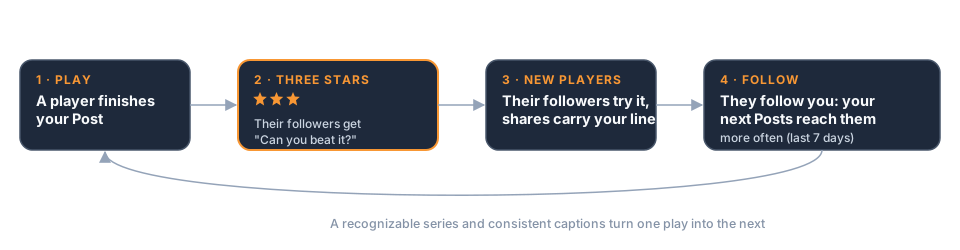
So a follow is an open door, not a subscription. You still have to give followers something fresh and good to walk through it.
Earn the follow
Players follow creators they recognize and want more from. Make that easy:
- Run a series. "Daily Maze #12" tells a player there was a #11 and there will be a #13. A numbered series turns one good play into a reason to come back.
- Keep your captions consistent. If your Posts share a recognizable style of caption, players start to spot your work in the feed before they even see your name.
- Keep your Game's personality steady. The same look, the same humor, the same kind of challenge. Surprise players with the content, not with who you are.
Tip: Your caption is often the first thing a returning player recognizes. Pick a format, such as "Daily Maze #12: the spiral", and stick to it.
Let your players do the talking
Your best marketing happens after the run ends.
When a player shares their result, the share message carries your flavor text. A funny or specific line ("Saved the cat. Lost the hat.") is much more likely to get a friend curious than a plain score. Writing flavor text: Land the Ending!.
And when a player earns three stars, their followers get a nudge: "Three stars. Can you beat it?" Every great run on your Post quietly invites more players in. That's another reason to make the ending feel rewarding and the flavor text worth reading.
Take it outside the app
Your audience isn't only on Minit Games. Every published Post has a public play link you can share anywhere: a group chat, a forum, your social accounts, a Discord server. You'll find it under the QR button in your Post's Live preview panel.
Anyone who taps it can play straight away. With the Minit Games app installed, it opens there; without it, it plays on a web page.
Share links work best with a challenge attached. "Here's a game" is easy to ignore. "I scored 4,200. Beat me." is hard to resist, and it sets up exactly the friendly competition that makes players stick around.
Warning: Share a published Post's link, not a draft preview link. Preview links are for testing, and plays on a draft don't count toward your stats.